

November 15, 2026
Back in February I introduced OVN Recon, an OpenShift Console plugin that draws how a node’s interfaces, bridges, and networks connect. The roadmap in that post included : “Finish adding another view to visualize OVN components like logical switches and routers.”
That view is now available, and it brought a lot of friends. OVN Recon v1.0.7 covers the logical side of the network as well as the physical, for every node in the cluster, from one searchable page.
What’s New
⭐ OVN Recon can now answer questions like:
- What did OVN-Kubernetes actually build for this UDN?
- Where is this IP address, and who owns it?
- Which nodes is this VLAN wired on, and why not the others?
- Which NetworkPolicy created this ACL?
- Does anything look broken right now?
Highlights:
- Tree view Navigate the cluster, its nodes, and its networks, with tabs for whatever you select.
- Physical topology Redesigned and improved to include deeper visibility into EVPN, VXLAN, SR-IOV, bonds, LLDP, and kernel routes.
- Logical topology The OVN switches and routers behind every network, per node or cluster-wide.
- Ports, Policy, and Services The OVN northbound database as sortable tables, tied back to Kubernetes owners.
- Network pages One page per CUDN, UDN, and NAD showing where it is wired.
- Find in cluster 🔎 Search an IP, CIDR, MAC, or name across every node.
- Findings ⚠️ Rules that flag what looks broken, with evidence and a remedy.
One Explorer for Everything
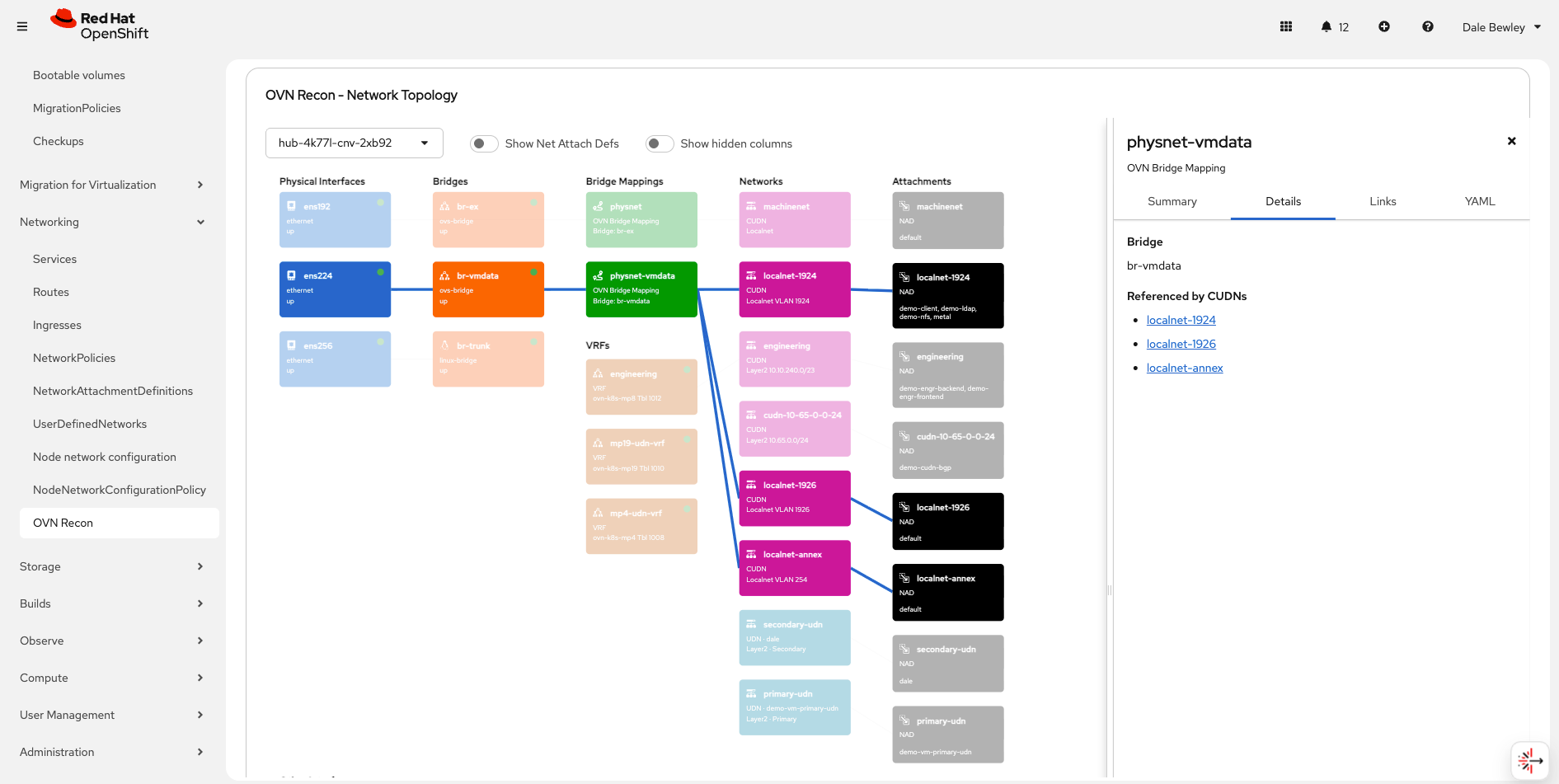
In February, OVN Recon was a single graph with a node dropdown above it.
Now Networking → OVN Recon opens an explorer. On the left is a tree of the cluster, its nodes, and its networks. On the right are the views of whatever you selected, as tabs.
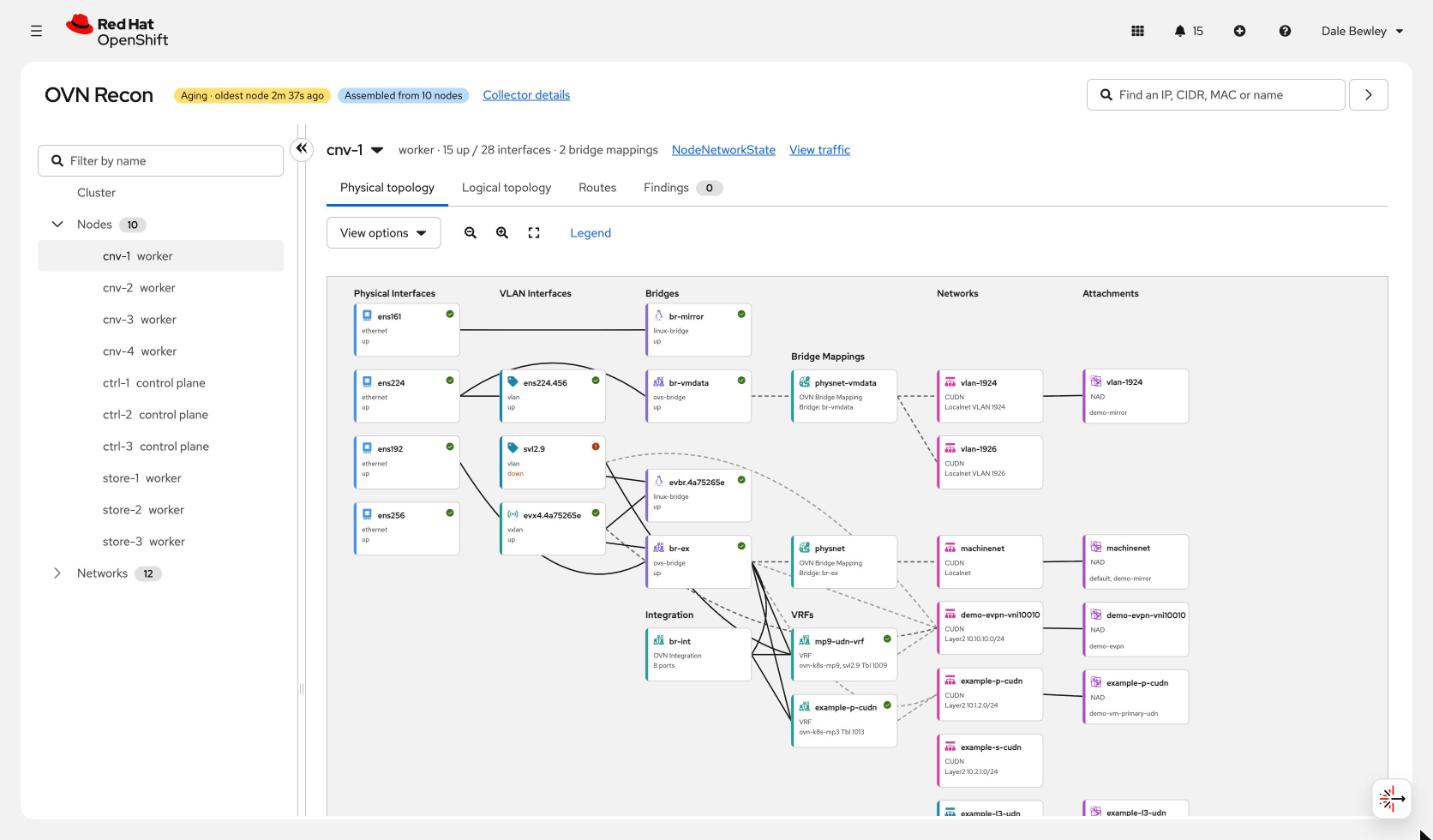
The explorer with a node selected: Physical topology, Logical topology, Routes, and Findings
- Cluster has tabs for Nodes, Networks, Findings, and Logical topology.
- A node has Physical topology, Logical topology, Routes, and Findings. The node name in the header is a switcher, so you can hop to another node and keep your tab.
- A network shows its spec, its findings, and where it is placed.
The tree can be resized or collapsed to a rail, and it remembers how you left it. Every view has its own URL, and selecting an object adds it to that URL, so you can paste a link to exactly the resource you are exploring.
The Logical Topology
This is the big one. 🎉
The physical view shows what NMState reports: the things you configure on a node. The logical view shows what OVN-Kubernetes builds in response inside the OVN northbound database: logical switches, routers, and the ports that join them.
That second half used to require oc rsh into an ovnkube-node pod and a fair amount of ovn-nbctl squinting. I wrote a post about doing it by hand.
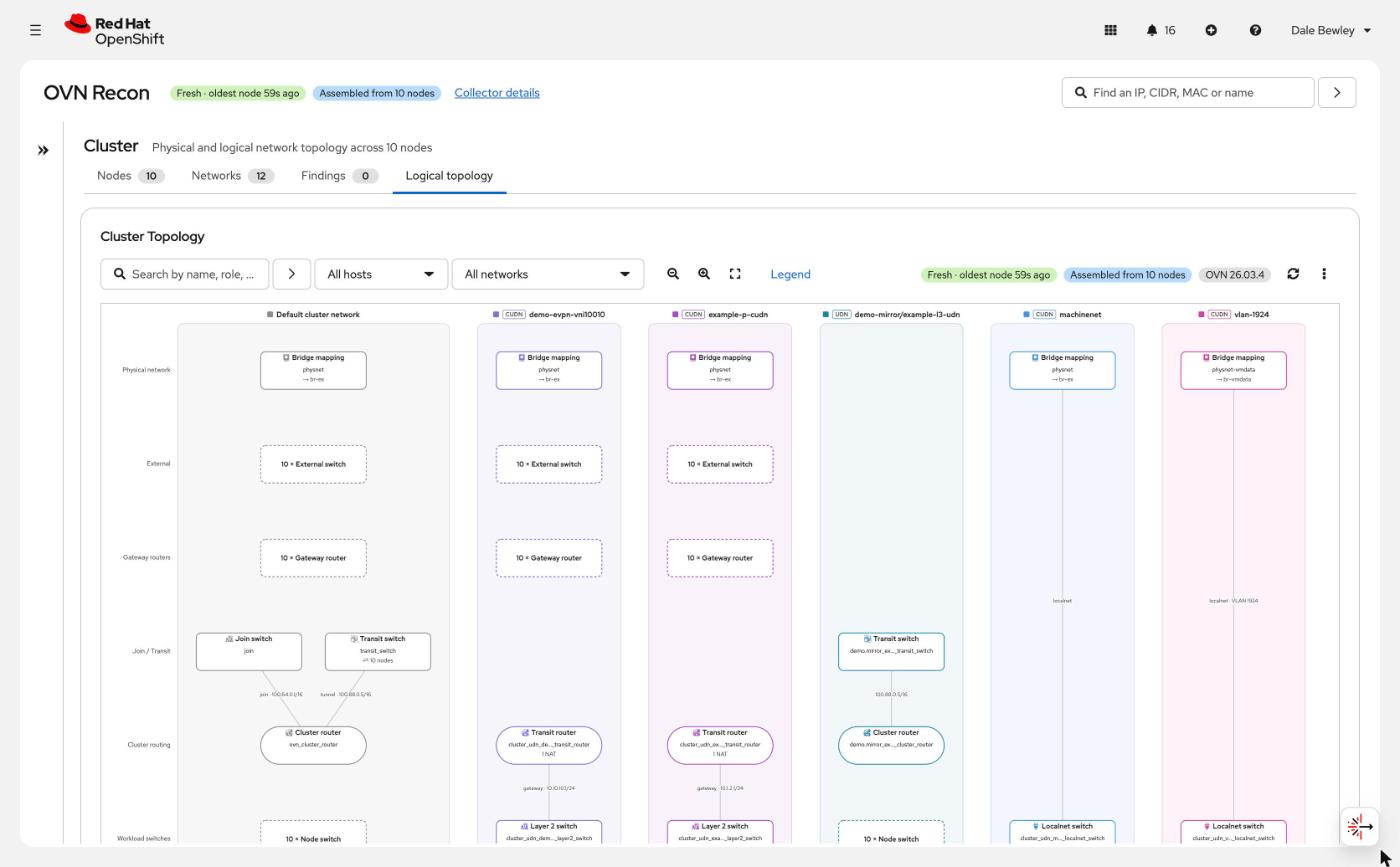
Cluster logical topology: the default network and five user defined networks side by side
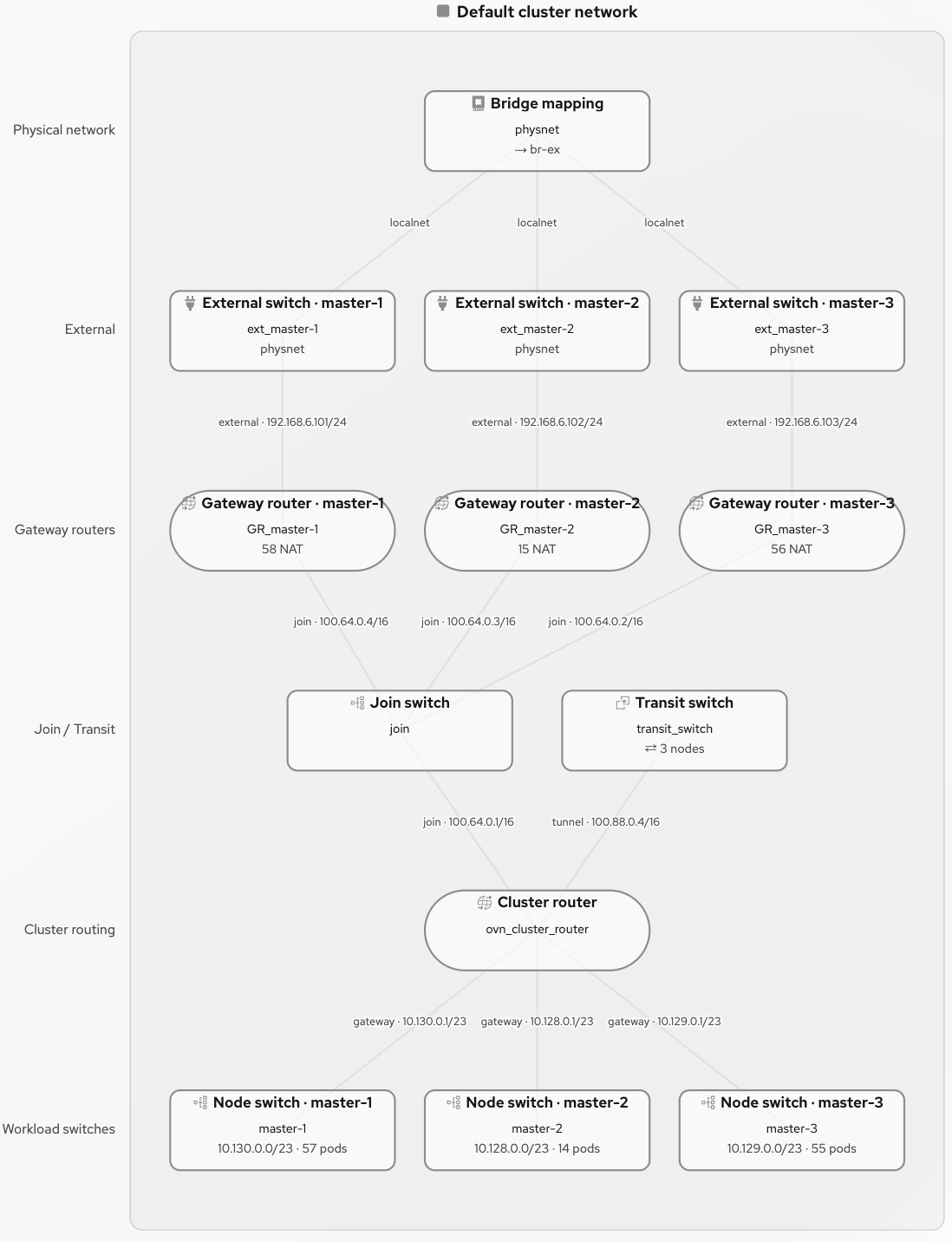
The layout is a ladder that reads the same way every time:
- Top to bottom is north to south. The physical network is at the top and the workloads are at the bottom. In between are the external switches, gateway routers, join and transit switches, and cluster routers.
- Left to right is one band per network. The default cluster network is always first, then each CUDN and UDN in its own color.
This makes the differences between topologies obvious at a glance. In the screenshot above, the two Layer2 primary CUDNs each get gateway routers, a transit router, and a single cluster-wide Layer 2 switch. The Layer3 UDN gets its own cluster router and a switch per node. The Localnet CUDNs on the right are just two rungs: a bridge mapping and a switch, with nothing to route.
Zones
Modern OVN-Kubernetes runs in interconnect mode, where every node hosts its own northbound database called a zone. That zone is one OVN deployment, the same idea as upstream OVN Interconnection. So there are two flavors of the logical view:
- Per node renders exactly one zone, which is what that node’s
ovn-controlleris working from. - Cluster merges every zone. Things that exist once per node, like gateway routers, collapse into a chip like “10 × Gateway router” that expands when clicked.
Select anything on the ladder and a drawer opens with the details.
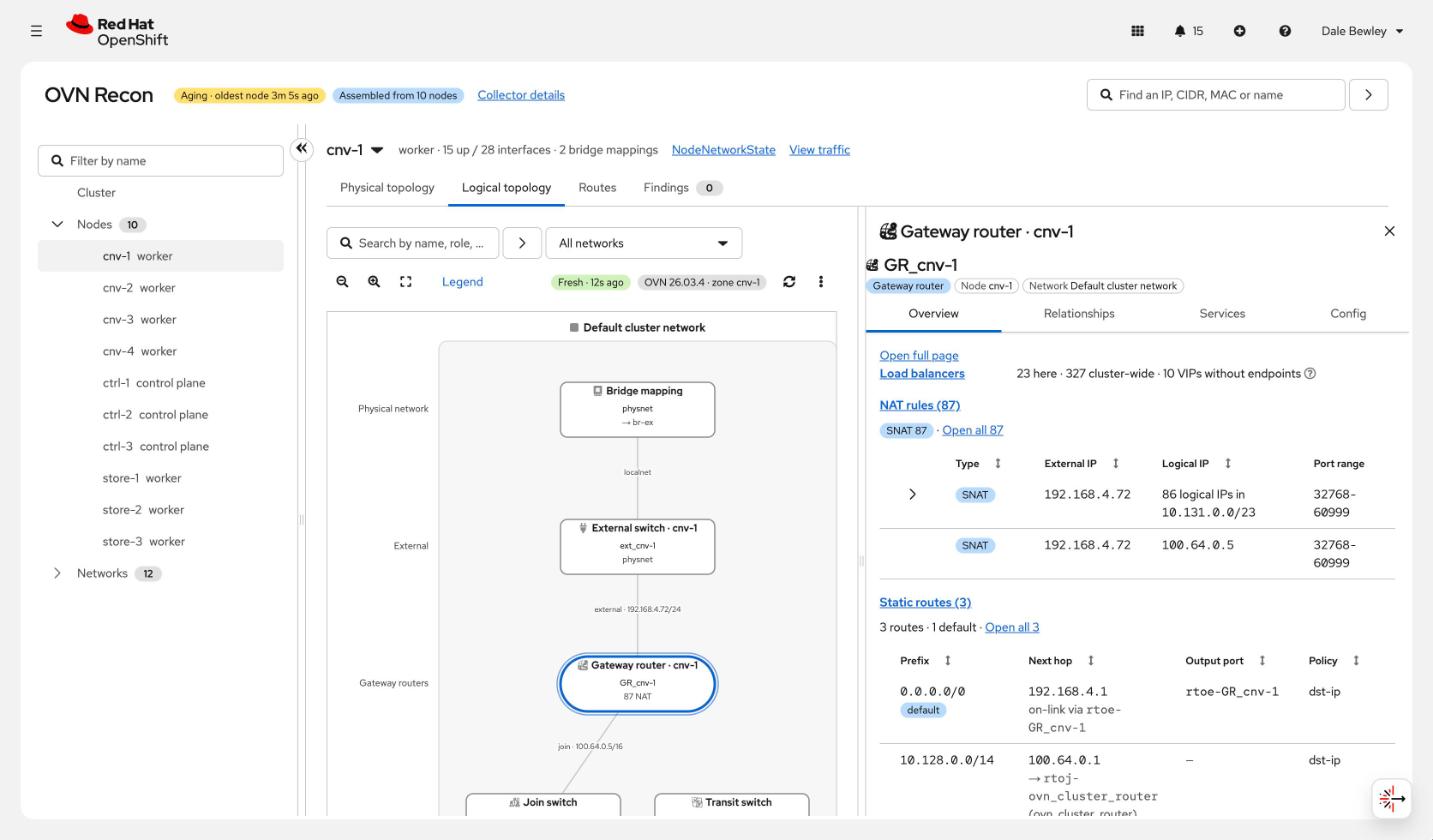
A gateway router’s NAT rules and static routes
The drawer tries to say what the configuration means. A gateway router with 87 SNAT rules shows one row reading “86 logical IPs in 10.131.0.0/23” instead of 86 nearly identical rows.
Ports, Policy, and Services
Every switch and router also has a full-width page with tabs for its Ports, Policy, and Services.
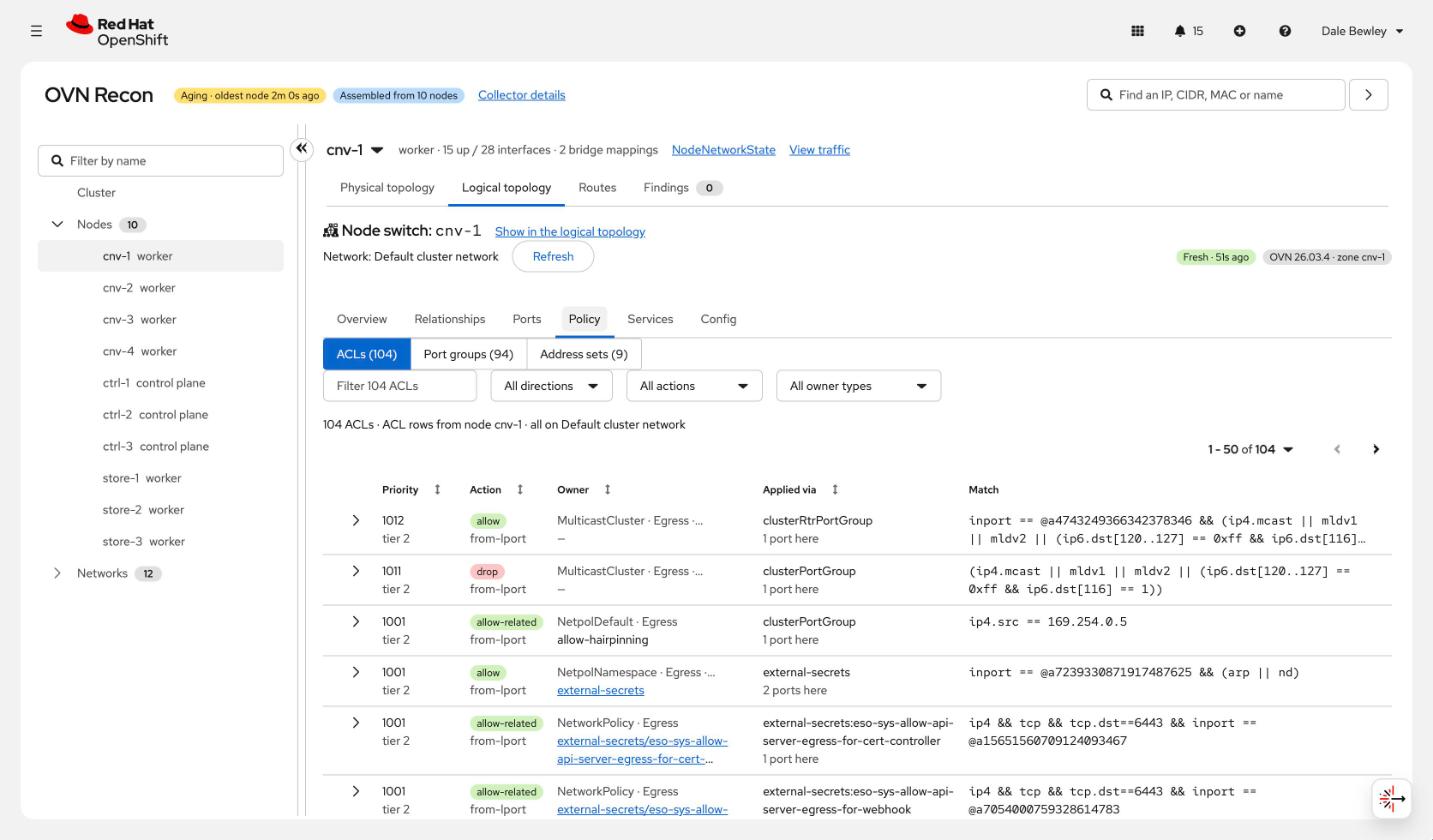
ACLs on a node switch, each attributed to the Kubernetes object that created it
OVN ACLs are not known for their readability, but each one here is credited to the Kubernetes object that caused it: a NetworkPolicy, a namespace default, a multicast rule. “Why is this traffic dropped?” gets a lot closer to “because of that policy, right there.”
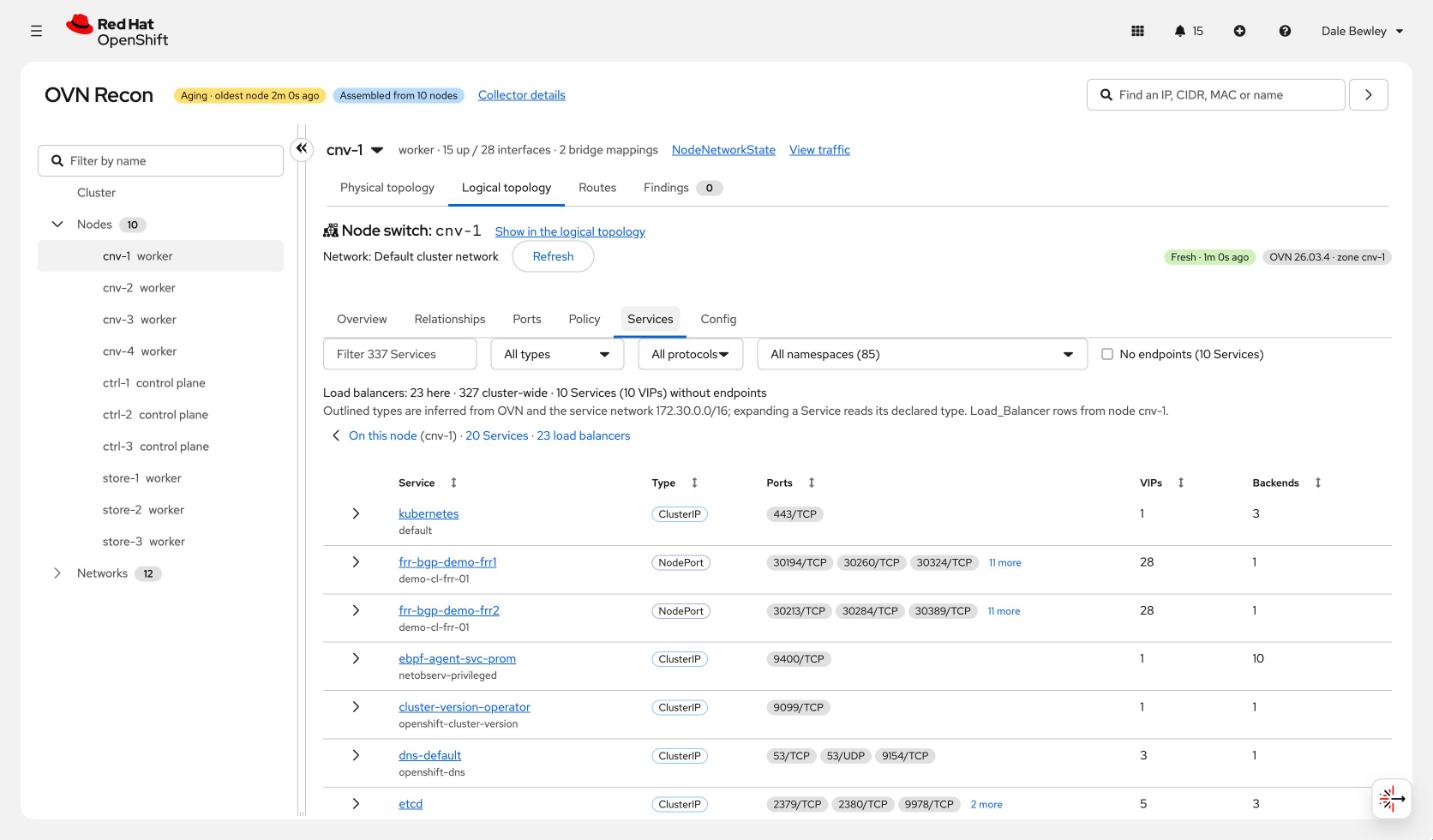
The Services tab does the same for OVN load balancers. It shows one row per Service with its VIPs and backends, and a filter for Services whose VIPs have no endpoints at all.
Where Does the Data Come From?
A small collector deployment reads the northbound tables from each node and caches the result. In February I described it as “very much a work in progress, just skip it for now.”
You can stop skipping it. The collector is now enabled by default. It currently serves from a JSON file on a disk cache, so pages paint right away. It only probes when somebody is looking.
Find Anything
There is a search box at the top of every view. Give it an IP address, a CIDR, a MAC, or part of a name.
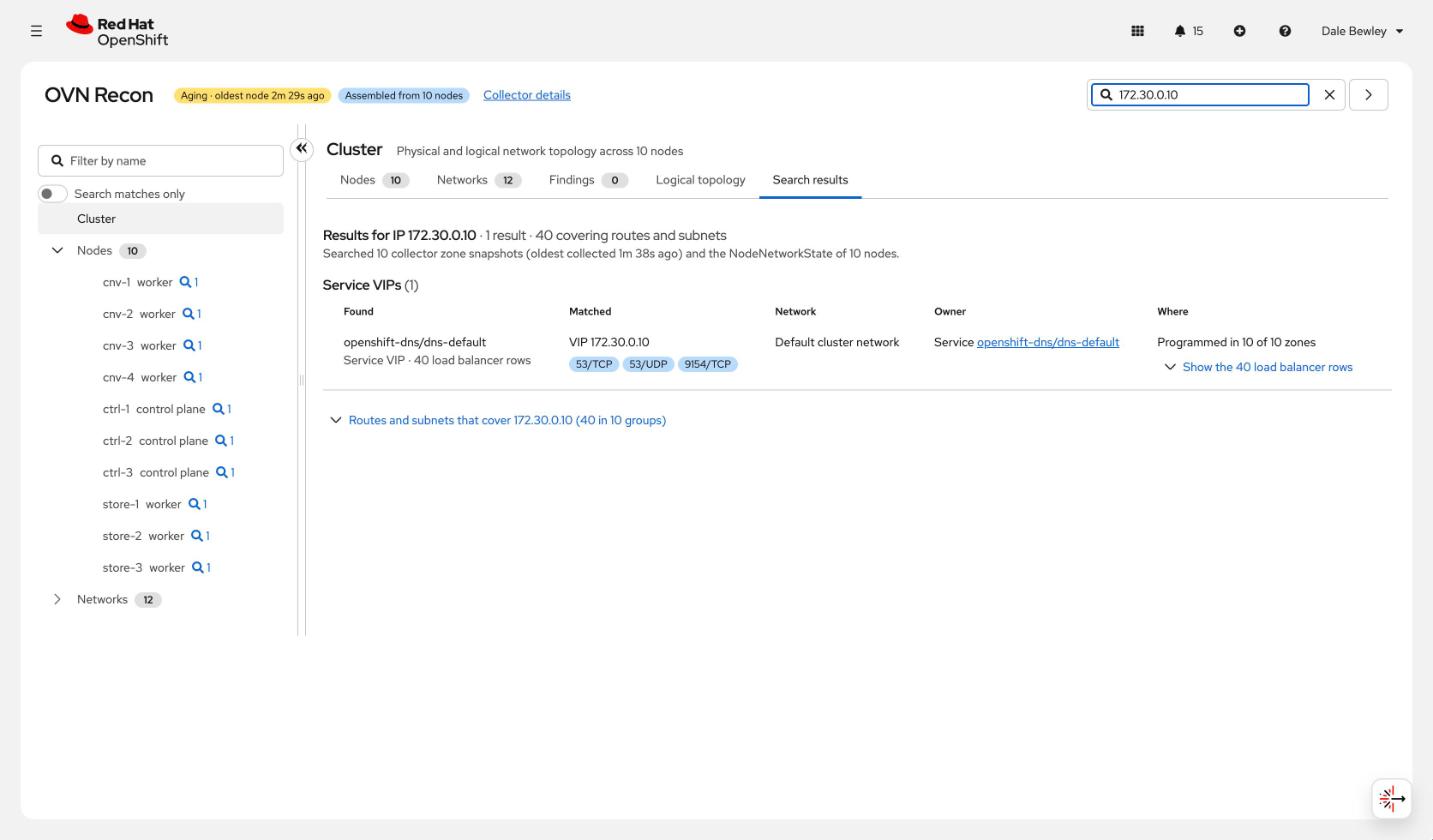
Searching for the cluster DNS Service IP across all 10 zones
It searches every node’s OVN snapshot and NodeNetworkState together. Results are grouped by kind (pod and VM ports, router ports, NAT rules, Service VIPs, node interfaces, routes), and each one opens the right view with that object already selected. The tree marks which nodes and networks hold a match.
One Page per Network
Every ClusterUserDefinedNetwork, UserDefinedNetwork, and NetworkAttachmentDefinition gets its own page with a summary of the spec and a placement table.
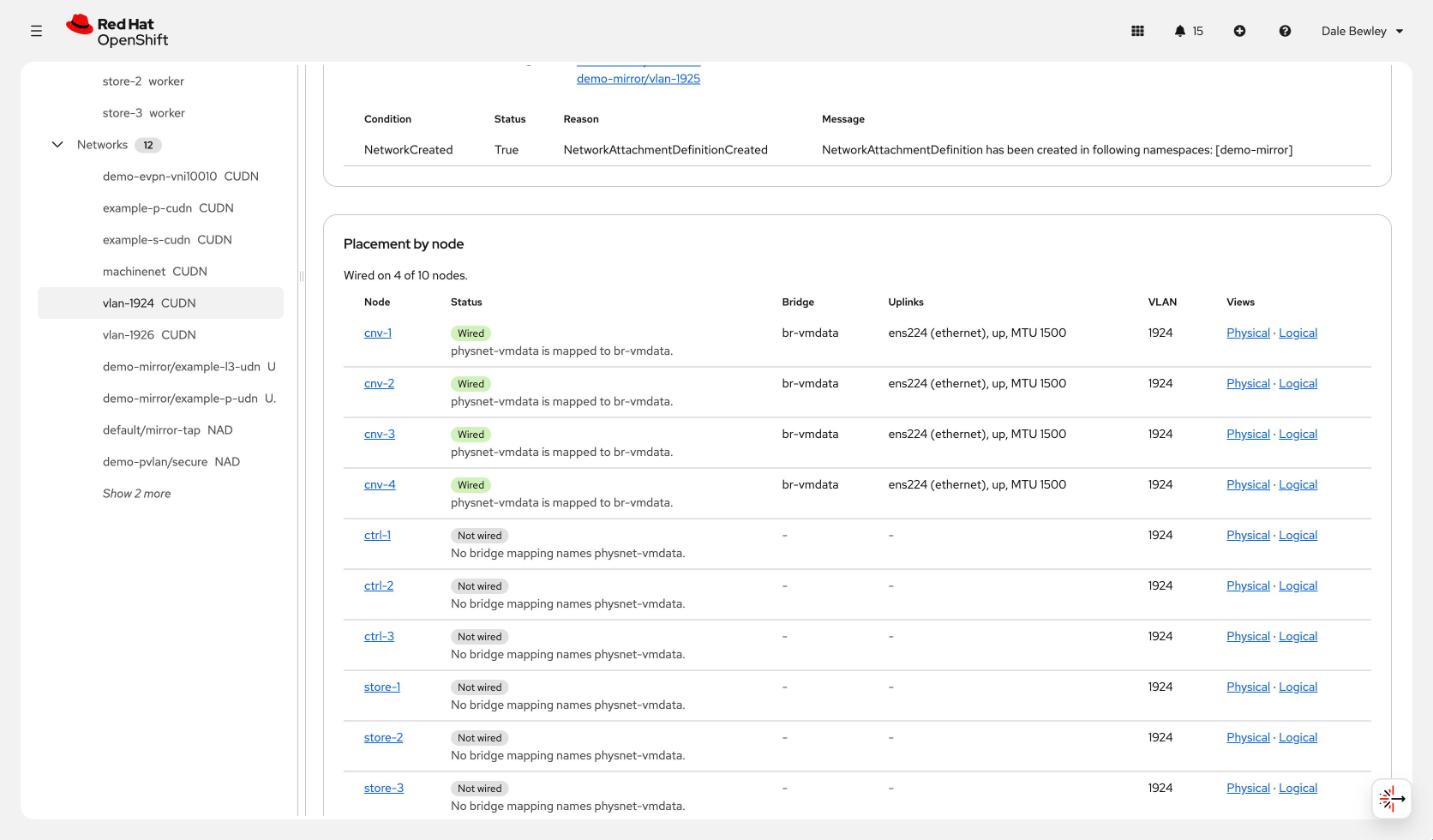
A Localnet CUDN wired on 4 of 10 nodes, with the reason for the other 6
The placement table answers a question I get asked a lot: “Why can’t my VM on that node use this VLAN?” Here vlan-1924 is wired on the four virtualization nodes and not on the others, and the table says why: no bridge mapping on those nodes names physnet-vmdata.
Findings
OVN Recon now has opinions. 🧐
A findings engine evaluates a set of rules against the physical and logical state and flags what looks wrong. Each finding comes with the evidence and a suggested remedy, and links to the object it is about. There are 13 rules so far, including:
- A Localnet network whose physical network is not mapped to a bridge on any node
- A bridge mapping that points at a bridge which does not exist
- A network MTU that exceeds its uplink
- A degraded bond or a failing
NodeNetworkConfigurationEnactment - A logical switch port that is down for a pod that has been Running for a while
- An ACL that references a port group or address set which does not exist
- A
MultiNetworkPolicythat names a missingNetworkAttachmentDefinition
Findings show up as badges in the tree, as pills on the graphs, and on Findings tabs at cluster and node scope.
A Deeper Physical View
The original physical view did not sit still either.
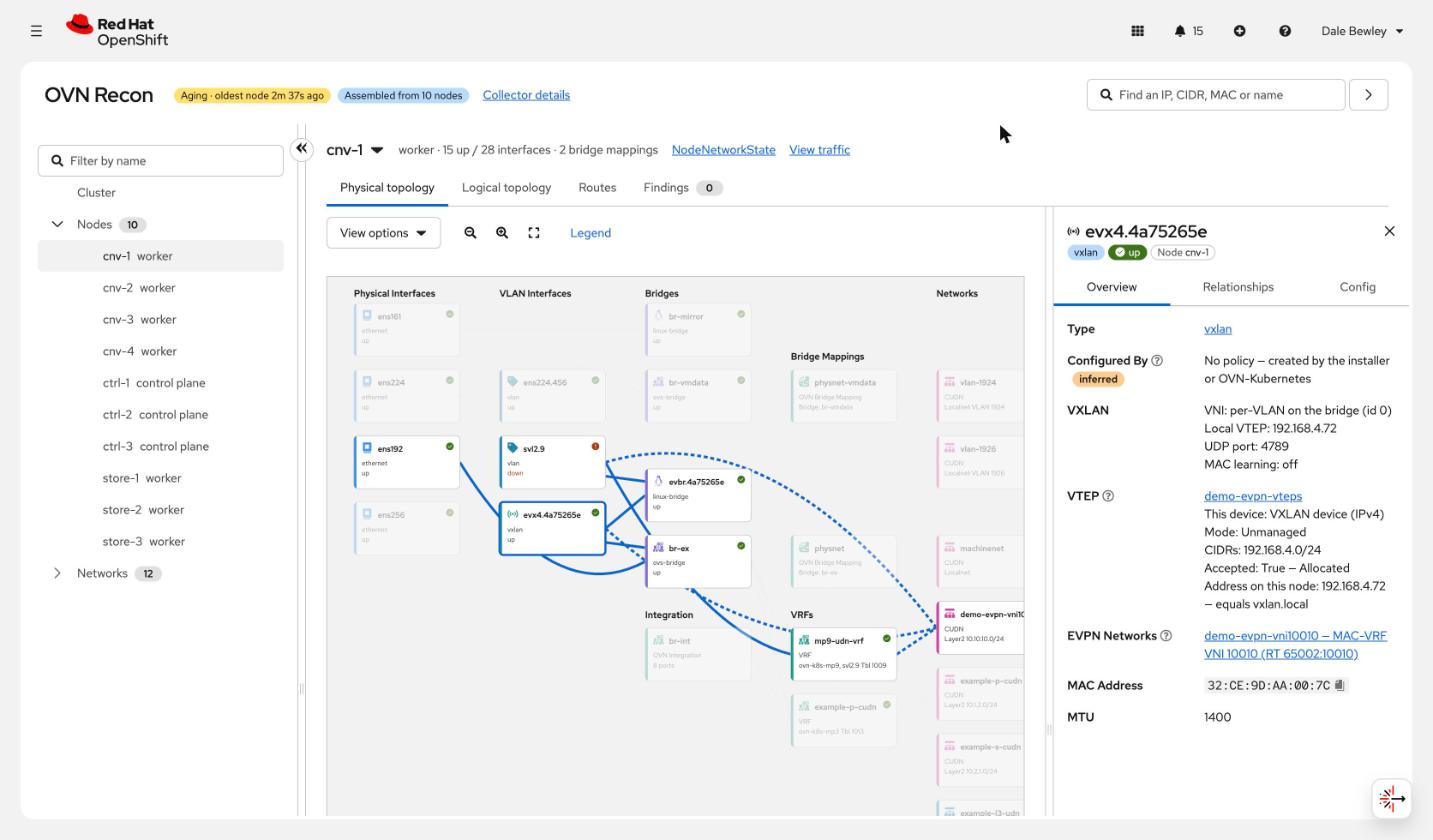
An EVPN VXLAN device resolved to its VTEP and MAC-VRF
- EVPN and VXLAN devices are drawn and linked to their VTEP and the network that uses them.
- VRFs link to the network they serve.
- SR-IOV virtual functions are drawn and tied to their physical function.
- Ethernet and bond drawers show driver, link speed, MTU, PCI address, LLDP neighbors, and bonding mode. That is a few fewer trips through
oc debug node. - Kernel routes are real tables, on a node’s Routes tab and in each VRF’s drawer.
- “Configured By” shows which
NodeNetworkConfigurationPolicyset up an interface or bridge mapping, or that no policy did. - Edges explain themselves. The drawer says why two things are connected.
Fitting Into the Console
OVN Recon also tries to be a better neighbor to the rest of the console.
It links out to the page that owns each object, whichever plugin draws it. Nodes, networks, and Services get a View traffic link into Network Observability when that is installed. Interfaces get a link to their details on the NMState page.
It can also come to you. An optional OVN Recon tab and an Open in OVN Recon action can appear on the console’s own Node, CUDN, UDN, and NAD pages.
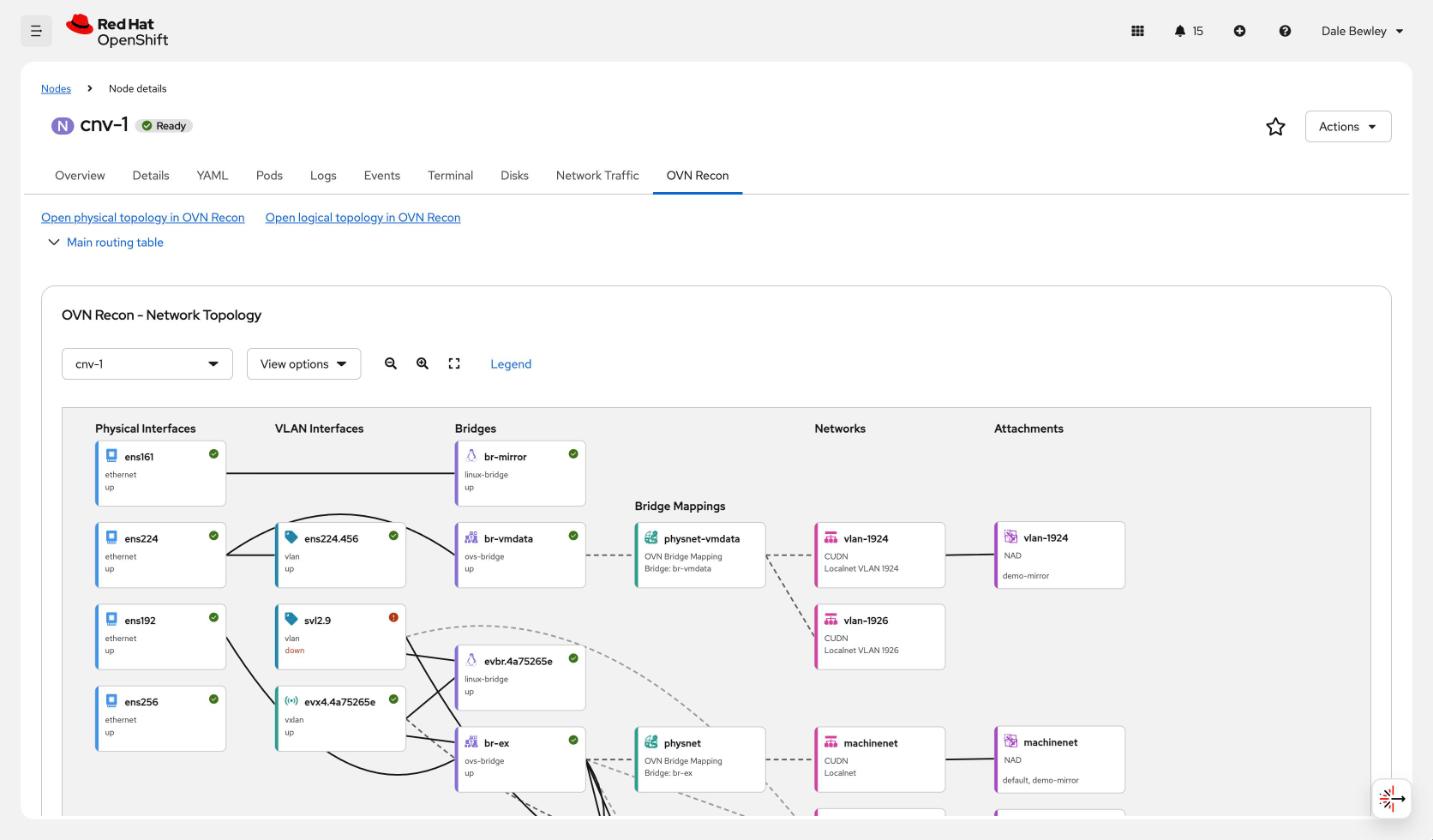
The optional OVN Recon tab on a Node details page
This is off by default, so installing OVN Recon will not rearrange anyone’s console. An administrator turns it on for everyone in the OvnRecon resource:
Visibility of these tabs can be restricted by removing read privilegs to the OvnRecon resource.
Installing or Upgrading
⚠️ Still Experimental
OVN Recon is a community project. It is not a Red Hat product and it is not supported by Red Hat. Use it at your own risk.
Evaluate OVN Recon in non-production environments only.
ℹ️ OpenShift 4.22 or later
OpenShift 4.22 changed the libraries the console shares with plugins, so OVN Recon v1.0 and later require OpenShift 4.22+.
Installation is the same as before. Import the CatalogSource, find “OVN Recon Operator” in the Software Catalog, install it, and create an OvnRecon instance.
A few things got easier:
- An empty
OvnReconis a full install. Plugin, collector, and cache are all on by default. The values the operator settled on are published instatus.effective. - Two catalog tags.
:stablehas releases only.:latestadds pre-releases, for the brave. - Multi-arch images for amd64 and arm64.
Roadmap Report Card
The February post ended with a list of ideas and todos. Here is how that went.
| February Roadmap | Status |
|---|---|
| Improve the details and summary tabs | ✅ Drawers are now Overview, Relationships, and Config |
| Add a view of OVN logical switches and routers | ✅ And then some |
| Show how NNCPs affect the configuration | ✅ “Configured By” in the drawer |
| Make the operator OpenShift version aware | ✅ v1.x installs only on 4.22+ |
| Add links to helpful documentation | 🟡 Links to console pages, not yet to docs |
| Add it to the Community Operators catalog | ⏳ Not yet |
| Parse an imported NNS | ⏳ Not yet |
| Rebase the images to UBI | ⏳ Not yet |
What’s Next
📋 Ideas and todos, round two:
- Routing and BGP. Follow a
RouteAdvertisementsresource through to FRR sessions and kernel routes. - Workload network path. A tab on Pods and VirtualMachines that traces every interface from the workload to the physical uplink.
- VMs, not launcher pods. Show the
VirtualMachinewherever a VM’s port appears. - More on the network pages. Which pods and VMs are attached on each node.
- More findings.
Summary
OVN Recon started as a way to help me explain how CUDNs change networking in OpenShift. It could show how one node was wired.
It can now show what OVN built on top of that wiring, for every node and every network. It can find an address anywhere in the cluster, and it can point at what looks broken. The goal has not changed: make the relationships visible so the mental model comes easier.
It is still built with AI coding agents. These days that is mostly Claude Code, with Beads still tracking the work. It is still experimental, so keep it out of production.
I’m building this for fun and educational puprposes. Give it a try and let me know what you think!
References
- OVN-Recon project
- OVN Recon: Making OpenShift Networking Connections
- OVN Recon v1.0.7 Release Notes
- OVN Recon Logical Visualization Guide
- Open Virtual Networking Inspection with OpenShift
- OVN-Kubernetes CNI
- OVN-Kubernetes Architecture
- OVN-Kubernetes Network Topology
- OVN Interconnection
- NMState Operator
- Network Observability Operator
- User Defined Networks in OpenShift
- OpenShift Route Advertisements
- Beads: A coding agent memory system
- Claude Code